LIRA-FEM RES API provides access to the calculation results of LIRA-FEM projects using programming languages that support ActiveX or COM technology, such as Visual Basic Script, JavaScript, C#, Java, Visual Basic, Visual Basic.NET, C++, Delphi, etc.
Contents
- Quick start: a simple example of using the LIRA-FEM RES API in C#
- Flexible request: an example of using the LIRA-FEM RES API that demonstrates how to save computing resources
- Exception handling: an example demonstrating how to avoid program crashes when attempting to retrieve nonexistent data
- LoadCaseDisplacements: access to node displacements from load cases
- LoadCaseForces: access to forces occurring in elements from load cases
- LoadCombinationDisplacements: access to node displacements from load combinations
- LoadCombinationForces: access to forces occurring in elements from load combinations
- FragmLoads: access to loads on a fragment
- PunchLoads: access to loads on punching perimeters
- DesignCombinationForces: access to forces occurring in elements from design combinations
- PeriodsOfVibrations: obtaining the frequencies of dynamic load cases
- SelectedReinforcement: access to element reinforcement data
- Interface table
Quick start: a simple example of using the LIRA-FEM RES API in C#
To develop a C# program in this example, we will use Microsoft Visual Studio. Its free edition, Microsoft Visual Studio Community Edition, can be downloaded from microsoft.com.
-
Creating a new project
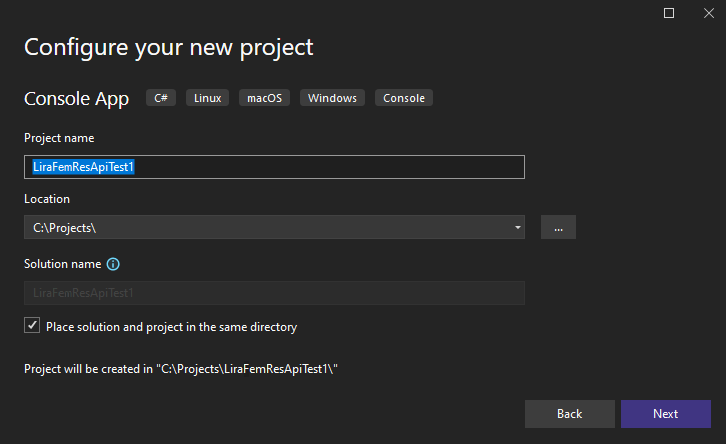 Fig.1
Fig.1Launch Visual Studio, select the menu item File --> New --> Project, and choose the project type Visual C# Console App. For the project Name, specify LiraFemResApiTest1, and for the Location, specify, for example,
C:\Projects\, then click OK. -
Adding a reference to the LIRA-FEM RES API type library
Go to the Solution Explorer window and right-click on the Dependencies item. In the context menu that opens, select Add COM Reference... Then select the LiraFemRes line and click OK.
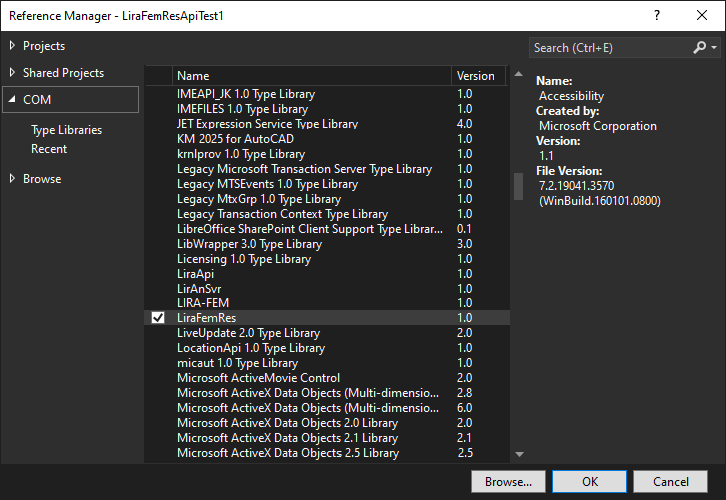 Fig.2
Fig.2If you don't see the LiraFemRes line in the list, it means that this type library is not registered. Reinstall LIRA-FEM or run
regsvr32.exeLiraResApi.dllas administrator. -
Running the calculation of the test problem
Open the test problem
05_Steel_tower.lirin LIRA-FEM and submit it for calculation. -
Return to the Microsoft Visual Studio development environment, open the
Program.csfile, and replace its contents with the following:// include the LiraFemRes library using LiraFemRes; var Result = new LiraResultsAccess(); // declaration and initialization of the Request interface LiraLoadCaseDisplacementsRequest Request = Result.CreateNewRequest(LiraRequestEnum.kLiraRequest_LoadCaseDisplacement) as LiraLoadCaseDisplacementsRequest; // declaration of the Response interface LiraLoadCaseDisplacementsResponse Response; // initialization of the DocumentName field (project name) Request.DocumentName = "05_Steel_tower"; // populating the Nodes array with the numbers of the nodes whose displacements we want to retrieve Request.Nodes.AddFromString("2-6"); Response = Result.LoadCaseDisplacements(Request); // the number of the load case for which we want to retrieve node displacements int lc = 1; for (int i = 0; i < Request.Nodes.Count; i++) { double X, Y, Z; int node = Request.Nodes.Item[i]; // retrieving the displacement data of node node from load case lc X = Response.GetNodeX(node, lc); Y = Response.GetNodeY(node, lc); Z = Response.GetNodeZ(node, lc); // printing the results to the console Console.WriteLine("Node: " + node); Console.WriteLine("X: " + X); Console.WriteLine("Y: " + Y); Console.WriteLine("Z: " + Z); Console.WriteLine(); }
-
Compiling the program
Select the menu item Build --> Build Solution.
-
Running the program
Select the menu item Debug --> Start Debugging.
When this example is run, the console will output the displacements of nodes 2, 3, 4, 5, 6 from load case No.1.
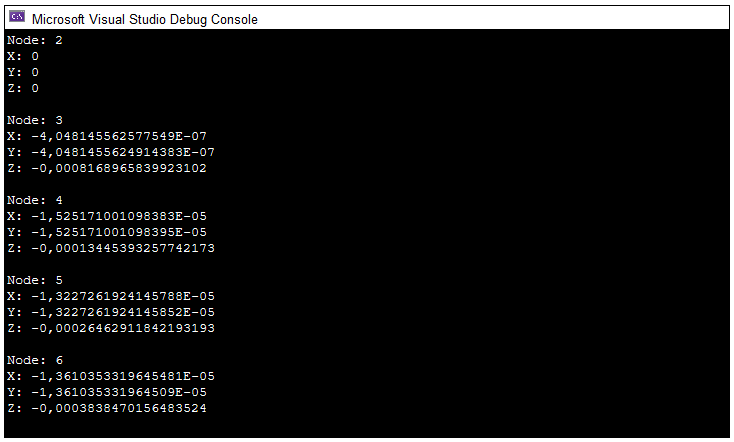 Fig.3
Fig.3 -
Creating the request.
We fill in the fields of the Request object (document name, list of nodes, ...).
-
Processing the request.
We call the LoadCaseDisplacements method on the Result object, and pass the result to the Response object.
-
Retrieving the data.
We call methods on the Response object (GetNodeX, GetNodeY, GetNodeZ).
Summary
In this example, we examined the mechanism for retrieving calculation result data. This process can be conditionally divided into three steps.
Flexible request: an example of using the LIRA-FEM RES API that demonstrates how to save computing resources
In the previous example from the Quick start section, when forming the request we filled in the fields: document name (DocumentName) and the list of nodes (Nodes); the program then printed the displacement coordinates of the nodes from the first load case to the console. The Response object retained data that we did not need, namely, the displacements of the nodes from load cases 2, 3 and 4, as well as data related to rotation at the nodes (Ux, Uy, Uz), warping B, and temperature T. We used our computer's resources inefficiently, so the time spent processing the request could have been shorter. For large problems, the difference in request processing speed can be substantial.
Let's optimize the code from the previous section by filling in the LoadCases and Directions fields, listing only the load cases and directions we are interested in. Let's add the following lines to our code:
// populating the LoadCases array with load case numbers
Request.LoadCases.AddFromString("1");
// populating the Directions array with the direction numbers (X, Y, Z) for which we want to retrieve displacements
Request.Directions.Count = 3;
Request.Directions.set_Item(0, (int)LiraDirectionEnum.kLiraDirection_X);
Request.Directions.set_Item(1, (int)LiraDirectionEnum.kLiraDirection_Y);
Request.Directions.set_Item(2, (int)LiraDirectionEnum.kLiraDirection_Z);
Summary
In the LIRA-FEM RES API, filling in the optional fields of the Request object can speed up request processing and reduce the amount of RAM used.
Exception handling: an example demonstrating how to avoid program crashes when attempting to retrieve nonexistent data
In the example from the Quick start section, when forming the request we filled the Nodes field with a range of node numbers from 2 to 6. Let's expand this range and request nodes numbered from 1 to 6. Let's replace the line in the Program.cs file:
Request.Nodes.AddFromString("2-6");
with
Request.Nodes.AddFromString("1-6");
Compile the program (Build --> Build Solution) and run it (Debug --> Start Debugging).
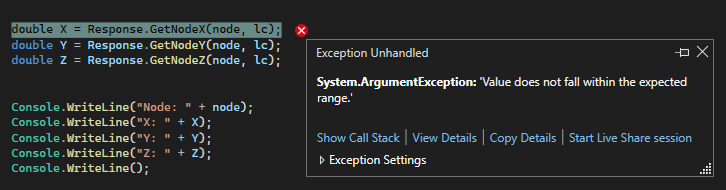
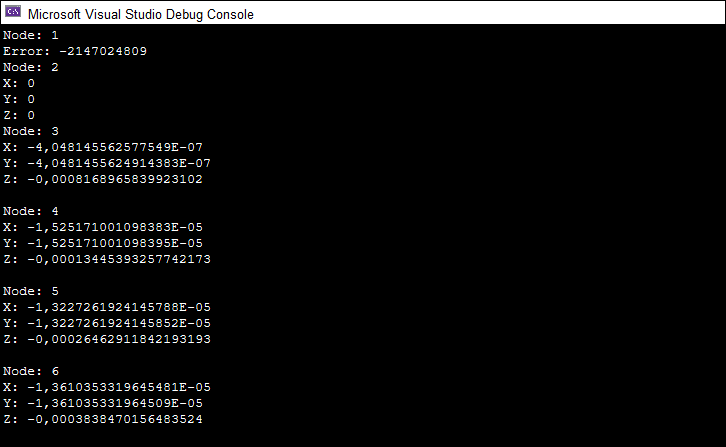
We got an error when trying to retrieve the displacement data of node 1 from load case 1 along the X axis. Why did this happen? In the 05_Steel_tower model, there is no node numbered 1 — we were trying to retrieve data that does not exist. To avoid such problems, you need to use try-catch exception handling statements. Below is a safe version of the code from the Quick start section:
// include the LiraFemRes library
using LiraFemRes;
var Result = new LiraResultsAccess();
// declaration and initialization of the Request interface
LiraLoadCaseDisplacementsRequest Request = Result.CreateNewRequest(LiraRequestEnum.kLiraRequest_LoadCaseDisplacement) as LiraLoadCaseDisplacementsRequest;
// declaration of the Response interface
LiraLoadCaseDisplacementsResponse Response;
// initialization of the DocumentName field (project name)
Request.DocumentName = "05_Steel_tower";
// populating the Nodes array with the numbers of the nodes whose displacements we want to retrieve
Request.Nodes.AddFromString("1-6");
Response = Result.LoadCaseDisplacements(Request);
// the number of the load case for which we want to retrieve node displacements
int lc = 1;
for (int i = 0; i < Request.Nodes.Count; i++)
{
	double X, Y, Z;
	int node = Request.Nodes.Item[i];

	// retrieving the displacement data of node node from load case lc
	try
	{
	X = Response.GetNodeX(node, lc);
	Y = Response.GetNodeY(node, lc);
	Z = Response.GetNodeZ(node, lc);
	}
	catch (Exception e)
	{
	Console.WriteLine("Node: " + node);
	Console.WriteLine("Error: " + e.HResult);
	Console.WriteLine();
	continue;
	}
	// printing the results to the console
	Console.WriteLine("Node: " + node);
	Console.WriteLine("X: " + X);
	Console.WriteLine("Y: " + Y);
	Console.WriteLine("Z: " + Z);
	Console.WriteLine();
}
Compile the program (Build --> Build Solution) and run it (Debug --> Start Debugging).
Summary
In cases where it is not reliably known whether the requested data exists in the calculation results, you need to use try-catch exception handling statements.
LoadCaseDisplacements: access to node displacements from load cases
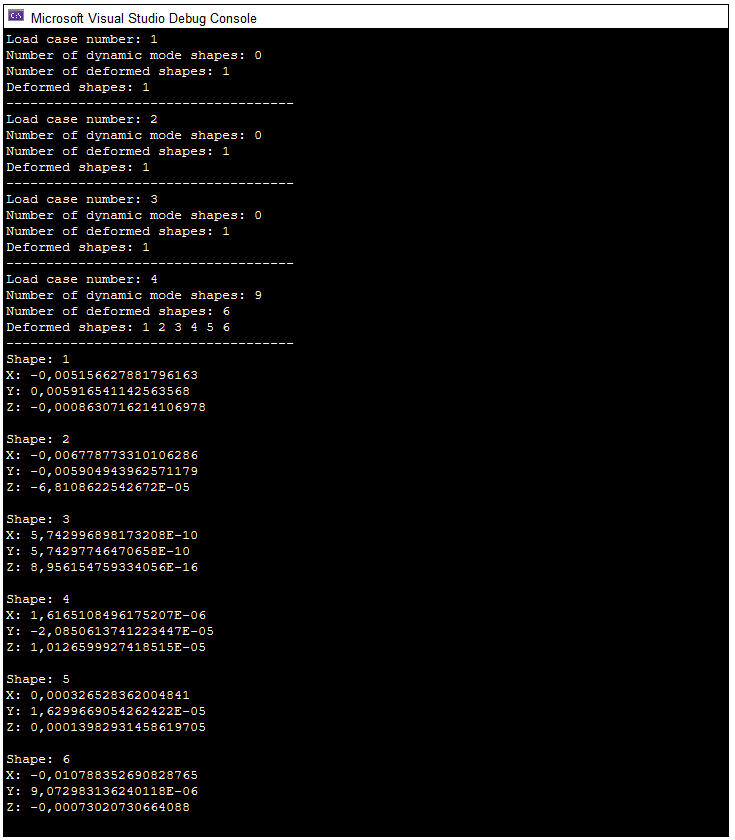
How to retrieve node displacements from load cases was discussed in the Quick start section. In this section, we will look at the case of a deformed shape, when a load case has displacement shapes (components). The LIRA-FEM RES API provides the ability to obtain detailed information about a load case. To do this, you need to use the LiraLoadCaseInfos interface (all load cases) and LiraLoadCaseInfo (a specific load case). The example below will print to the console detailed information about all load cases of the 05_Steel_tower.lir problem, as well as the displacements of node No.37 from load case No.4 for all components.
// include the LiraFemRes library
using LiraFemRes;
var Result = new LiraResultsAccess();
// declaration and initialization of the Request interface
LiraLoadCaseDisplacementsRequest Request = Result.CreateNewRequest(LiraRequestEnum.kLiraRequest_LoadCaseDisplacement)
as LiraLoadCaseDisplacementsRequest;
// declaration of the Response interface
LiraLoadCaseDisplacementsResponse Response;
// initialization of the DocumentName field (project name)
Request.DocumentName = "05_Steel_tower";
// populating the Nodes array with node numbers
Request.Nodes.AddFromString("2-37");
// requesting the components
Request.Deformation = LiraDeformationEnum.kLiraDeformation_DeformedShape;
// processing the request
try
{
	Response = Result.LoadCaseDisplacements(Request);
}
catch (Exception e)
{
	Console.WriteLine("Error: " + e.HResult);
	return;
}
// retrieving load case data
LiraLoadCaseInfos LoadCases = Response.LoadCases;
for (int i = 0; i < LoadCases.Count; i++)
{
	LiraLoadCaseInfo LoadCase = LoadCases.Item[i];
	// printing the load case number
	Console.WriteLine("Load case number: " + LoadCase.Number);
	// printing the number of mode shapes
	Console.WriteLine("Number of dynamic mode shapes: " + LoadCase.DynamicModeShapeCount);
	// printing the number of components
	Console.WriteLine("Number of deformed shapes: " + LoadCase.DeformedShapeCount);
	// printing the numbers of the components
	var DynamicModeShapesArray = new LiraLongsArray();
	DynamicModeShapesArray = LoadCase.DeformedShapes;
	Console.Write("Deformed shapes: ");
	for (int j = 0; j < DynamicModeShapesArray.Count; j++)
		Console.Write(DynamicModeShapesArray.Item[j] + " ");
	Console.WriteLine("\n------------------------------------");
}
// declaration of the ShapesArray array
var ShapesArray = new LiraLongsArray();
// populating the ShapesArray array with the component numbers
ShapesArray = LoadCases.Item[3].DeformedShapes;
// load case number
int lc = LoadCases.Item[3].Number;
// node number
int node = 37;
// printing the displacements of node No.37 from load case No.4 for all components
for (int i = 0; i < ShapesArray.Count; i++)
{
	// component number
	int shape = ShapesArray.Item[i];
	Console.WriteLine("Shape: " + shape);
	Console.WriteLine("X: " + Response.GetNodeX(node, lc, shape));
	Console.WriteLine("Y: " + Response.GetNodeY(node, lc, shape));
	Console.WriteLine("Z: " + Response.GetNodeZ(node, lc, shape));
	Console.WriteLine();
}
Compile the program (Build --> Build Solution) and run it (Debug --> Start Debugging).
LoadCaseForces: access to forces occurring in elements from load cases
To access the forces occurring in elements from load cases, you will need the LiraLoadCaseInfos interface (information about all load cases), LiraLoadCaseInfo (information about a specific load case), LiraLoadCaseForcesRequest (forming the request) and LiraLoadCaseForcesResponse (retrieving the finite element data). The example below will print to the console detailed information about all load cases of the 05_Steel_tower.lir problem, as well as data about element No.37 (finite element type, number of sections, list and values of forces from load case No.1).
// include the LiraFemRes library
using LiraFemRes;
var Result = new LiraResultsAccess();
// declaration and initialization of the Request interface
LiraLoadCaseForcesRequest Request = Result.CreateNewRequest(LiraRequestEnum.kLiraRequest_LoadCaseForces) as LiraLoadCaseForcesRequest;
// declaration of the Response interface
LiraLoadCaseForcesResponse Response;
// initialization of the DocumentName field (project name)
Request.DocumentName = "05_Steel_tower";
// populating the Elements array with finite element numbers
Request.Elements.AddFromString("1-144");
// processing the request
try
{
	Response = Result.LoadCaseForces(Request);
}
catch (Exception e)
{
	Console.WriteLine("Error: " + e.HResult);
	return;
}
// retrieving data about all load cases
LiraLoadCaseInfos LoadCases = Response.LoadCases;
for (int i = 0; i < LoadCases.Count; i++)
{
	LiraLoadCaseInfo LoadCase = LoadCases.Item[i];
	// printing the load case number
	Console.WriteLine("Load case number: " + LoadCase.Number);
	// printing the number of mode shapes
	Console.WriteLine("Number of dynamic mode shapes: " + LoadCase.DynamicModeShapeCount);
	// printing the number of components
	Console.WriteLine("Number of deformed shapes: " + LoadCase.DeformedShapeCount);
	// printing the numbers of the components
	var DynamicModeShapesArray = new LiraLongsArray();
	DynamicModeShapesArray = LoadCase.DeformedShapes;
	Console.Write("Deformed shapes: ");
	for (int j = 0; j < DynamicModeShapesArray.Count; j++)
		Console.Write(DynamicModeShapesArray.Item[j] + " ");
	Console.WriteLine("\n------------------------------------");
}
// load case number
int LC = LoadCases.Item[0].Number;
// element number
int Element = 37;
// printing the finite element number to the console
Console.WriteLine("Element number: " + Element);
// printing the load case number to the console
Console.WriteLine("Load cases number: " + LC);
// list of finite element family names (LiraElementFamilyEnum)
string[] ElementFamilyes = { "Undefined", "Bar", "Plate", "Solid", "SpecElement", "Spec_58_5", "Spec_310", "Spec_264" };
// retrieving the family (type) of the finite element
int ElementFamily = (int)Response.GetFamily(Element);
// printing the name of the family the finite element belongs to, to the console
Console.WriteLine("Element family: " + ElementFamilyes[ElementFamily]);
// initialization of the list of internal forces (LiraForceEnum)
string[] StringElementForces = { "Undefined", "BarN", "BarMx", "BarMy", "BarQz", "BarMz", "BarQy", "BarRy", "BarRz", "BarBw", "BarTw", "PlateNx", "PlateNy", "PlateNz", "PlateTxy", "PlateTxz", "PlateMx", "PlateMy", "PlateMxy", "PlateQx", "PlateQy", "PlateRz", "SolidNx", "SolidNy", "SolidNz", "SolidTxy", "SolidTxz", "SolidTyz", "SpecElementRx", "SpecElementRy", "SpecElementRz", "SpecElementRux", "SpecElementRuy", "SpecElementRuz", "Spec_58_59_Qz", "Spec_58_59_Ny", "Spec_58_59_Qx", "Spec_310_N", "Spec_310_My", "Spec_310_Qz", "Spec_310_Mx", "Spec_310_Mz", "Spec_310_Qy", "Spec_264_N", "Spec_264_Qz", "Spec_264_Qy" };
// retrieving the forces in the finite element
LiraLongsArray ElementForces = Response.GetForces(Element);
// printing the list of forces in the finite element to the console
Console.Write("Forces: ");
for (int i = 0; i < ElementForces.Count; i++)
    Console.Write(StringElementForces[ElementForces.Item[i]] + " ");
Console.WriteLine("\n------------------------------------");
// number of sections in the element
int SectionCount = Response.GetSectionCount(Element);
// printing the force values in the element Element from load case LC for all sections
for (int i = 1; i <= SectionCount; i++)
{
	Console.WriteLine("Section: " + i);
	Console.WriteLine("BarN: " + Response.GetBarN(Element, i, LC));
	Console.WriteLine("BarMx: " + Response.GetBarMx(Element, i, LC));
	Console.WriteLine("BarMy: " + Response.GetBarMy(Element, i, LC));
	Console.WriteLine("BarQz: " + Response.GetBarQz(Element, i, LC));
	Console.WriteLine("BarMz: " + Response.GetBarMz(Element, i, LC));
	Console.WriteLine("BarQy: " + Response.GetBarQy(Element, i, LC));
	Console.WriteLine("");
}
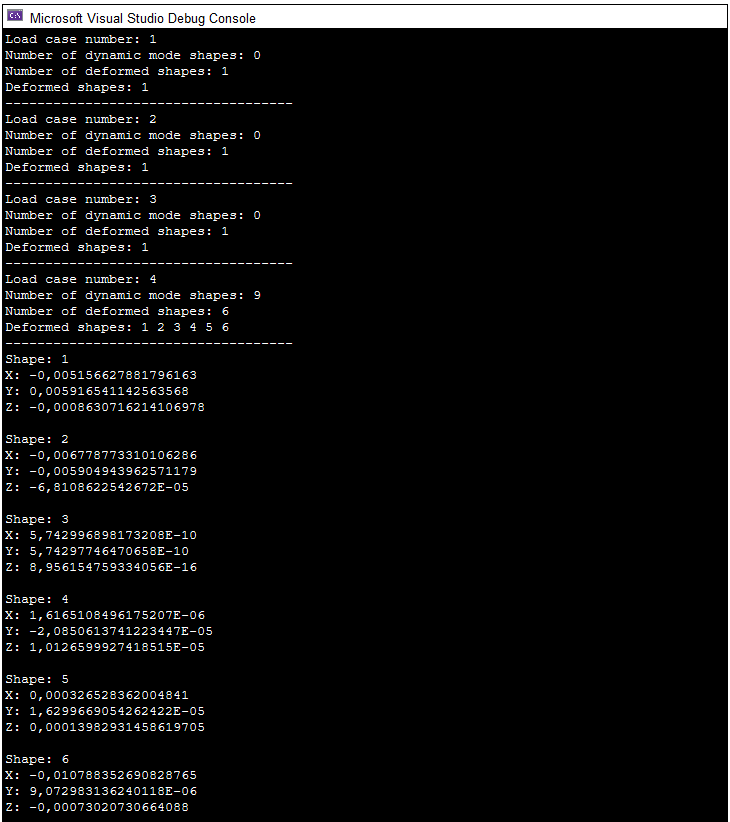
Compile the program (Build --> Build Solution) and run it (Debug --> Start Debugging).
LoadCombinationDisplacements: access to node displacements from load combinations
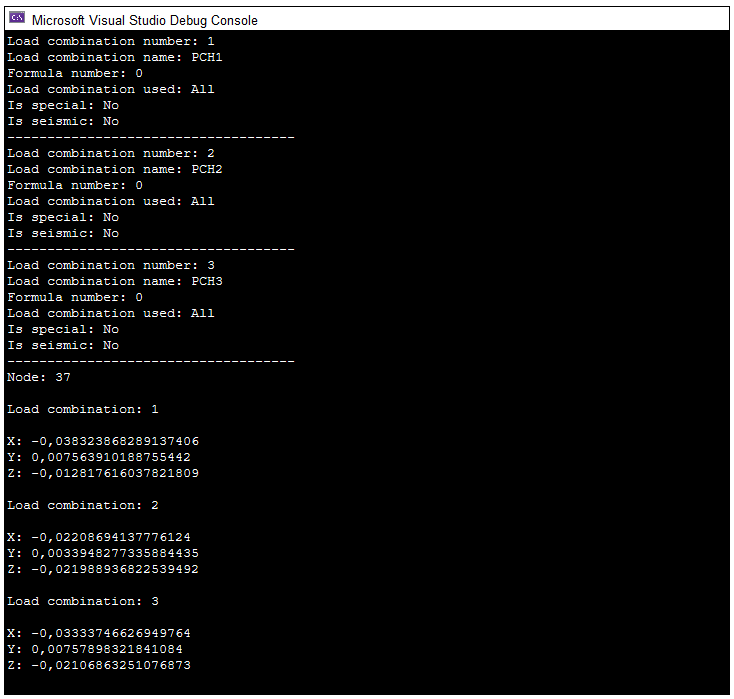
To obtain data on node displacements from load combinations, you will need the LiraLoadCombinationInfos interface (information about all load combinations), LiraLoadCombinationInfo (information about a specific load combination), LiraLoadCombinationDisplacementsRequest (forming the request), and LiraLoadCombinationDisplacementsResponse (retrieving displacements). Open the test problem 05_Steel_tower_RSN.lir in LIRA-FEM and submit it for calculation. Then copy the example code below and paste it into your C# project. How to create a project in Visual Studio is described here.
// include the LiraFemRes library
using LiraFemRes;
var Result = new LiraResultsAccess();
// declaration and initialization of the Request interface
LiraLoadCombinationDisplacementsRequest Request = Result.CreateNewRequest(LiraRequestEnum.kLiraRequest_LoadCombinationDisplacements) as LiraLoadCombinationDisplacementsRequest;
// declaration of the Response interface
LiraLoadCombinationDisplacementsResponse Response;
// initialization of the DocumentName field (project name)
Request.DocumentName = "05_Steel_tower_RSN";
// populating the Nodes array with node numbers
Request.Nodes.AddFromString("2-37");
// initialization of the load combination table number
Request.LoadCombinationTable = 1;
// processing the request
try
{
	Response = Result.LoadCombinationDisplacements(Request);
}
catch (Exception e)
{
	Console.WriteLine("Error: " + e.HResult);
	return;
}
// retrieving data about all load combinations
LiraLoadCombinationInfos LoadCombinations = Response.LoadCombinations;
// serviceability limit states of the load combination (LiraLoadCombinationUseEnum)
string[] LoadCombinationUsed = { "All", "Cracks", "Deflections" };
for (int i = 0; i < LoadCombinations.Count; i++)
{
	LiraLoadCombinationInfo LoadCombination = LoadCombinations.Item[i];
	// printing the load combination number
	Console.WriteLine("Load combination number: " + LoadCombination.Number);
	// printing the load combination name
	Console.WriteLine("Load combination name: " + LoadCombination.Name);
	// printing the formula number
	Console.WriteLine("Formula number: " + LoadCombination.FormulaNumber);
	// printing the serviceability limit state of the load combination
	Console.WriteLine("Load combination used: " + LoadCombinationUsed[(int)LoadCombination.LoadCombinationUsed]);
	// whether the load combination is special
	Console.Write("Is special: ");
	if (LoadCombination.IsSpecial != 0)
		Console.WriteLine("Yes");
	else
		Console.WriteLine("No");
	// whether the load combination is seismic
	Console.Write("Is seismic: ");
	if (LoadCombination.IsSeismic != 0)
		Console.WriteLine("Yes");
	else
    Console.WriteLine("No");

	Console.WriteLine("\n------------------------------------");
}
// node number
int node = 37;
// printing displacements for node node from all load combinations
Console.WriteLine("Node: "+ node);
for (int i = 0; i < LoadCombinations.Count; i++)
{
	// load combination number
	int lc = LoadCombinations.Item[i].Number;
	Console.WriteLine("\nLoad combination: " + lc);
	Console.WriteLine();
	Console.WriteLine("X: " + Response.GetNodeX(node, lc));
	Console.WriteLine("Y: " + Response.GetNodeY(node, lc));
	Console.WriteLine("Z: " + Response.GetNodeZ(node, lc));
}
Compile the program (Build --> Build Solution) and run it (Debug --> Start Debugging).
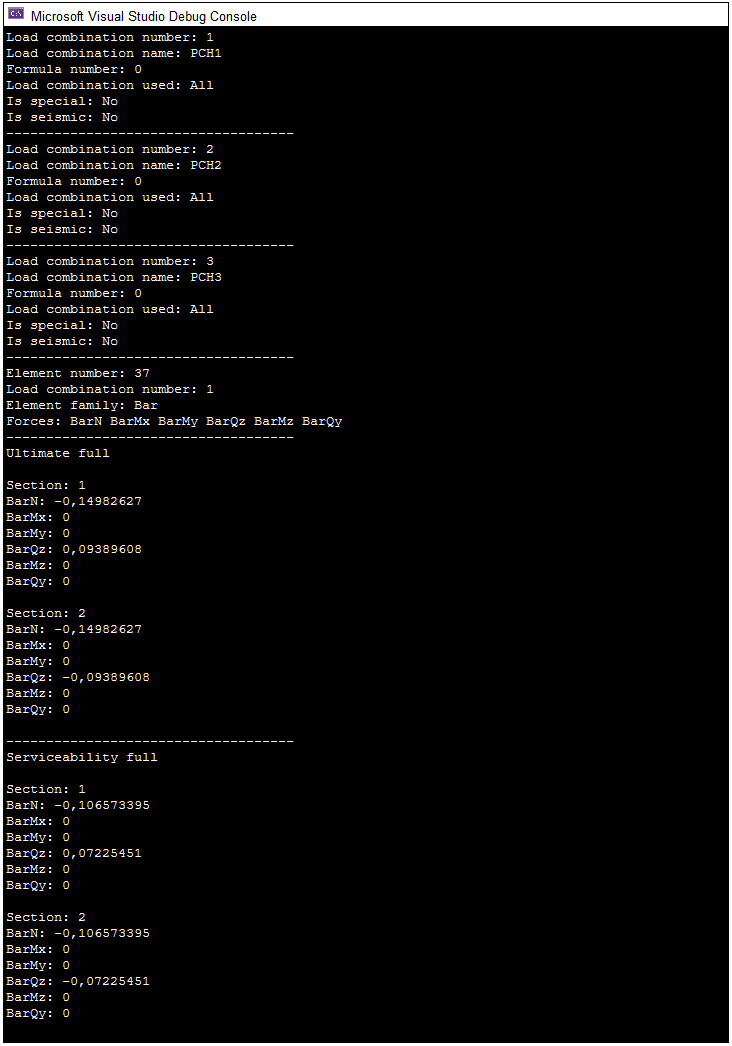
LoadCombinationForces: access to forces occurring in elements from load combinations
To obtain data on forces from load combinations, you will need the LiraLoadCombinationInfos interface (information about all load combinations), LiraLoadCombinationInfo (information about a specific load combination), LiraLoadCombinationForcesRequest (forming the request), and LiraLoadCombinationForcesResponse (retrieving forces). Open the test problem 05_Steel_tower_RSN.lir in LIRA-FEM and submit it for calculation. Then copy the example code below and paste it into your C# project. How to create a project in Visual Studio is described here.
// include the LiraFemRes library
using LiraFemRes;
var Result = new LiraResultsAccess();
// declaration and initialization of the Request interface
LiraLoadCombinationForcesRequest Request = Result.CreateNewRequest(LiraRequestEnum.kLiraRequest_LoadCombinationForces) as LiraLoadCombinationForcesRequest;
// declaration of the Response interface
LiraLoadCombinationForcesResponse Response;
// initialization of the DocumentName field (project name)
Request.DocumentName = "05_Steel_tower_RSN";
// populating the Elements array with finite element numbers
Request.Elements.AddFromString("1-144");
// initialization of the load combination table number
Request.LoadCombinationTable = 1;
// initialization of the array containing the list of internal force limit states (ultimate and serviceability load combinations)
// to retrieve all limit states, leave the LoadCombinationLimitState field empty, or list all the limit state types
Request.LoadCombinationLimitState.Count = 2;
// ultimate load combinations
Request.LoadCombinationLimitState.Item[0] = (int)LiraLimitStateForcesEnum.kLiraLimitStateForces_UltimateFull;
// serviceability load combinations
Request.LoadCombinationLimitState.Item[1] = (int)LiraLimitStateForcesEnum.kLiraLimitStateForces_ServiceabilityFull;
// processing the request
try
{
	Response = Result.LoadCombinationForces(Request);
}
catch (Exception e)
{
	Console.WriteLine("Error: " + e.HResult);
	return;
}
// retrieving data about all load combinations
LiraLoadCombinationInfos LoadCombinations = Response.LoadCombinations;
// serviceability limit states of the load combination (LiraLoadCombinationUseEnum)
string[] LoadCombinationUsed = { "All", "Cracks", "Deflections" };
for (int i = 0; i < LoadCombinations.Count; i++)
{
	LiraLoadCombinationInfo LoadCombination = LoadCombinations.Item[i];
	// printing the load combination number
	Console.WriteLine("Load combination number: " + LoadCombination.Number);
	// printing the formula number
	Console.WriteLine("Formula number: " + LoadCombination.FormulaNumber);
	// printing the serviceability limit state of the load combination
	Console.WriteLine("Load combination used: " + LoadCombinationUsed[(int)LoadCombination.LoadCombinationUsed]);
	// whether the load combination is special
	Console.Write("Is special: ");
	if (LoadCombination.IsSpecial != 0)
		Console.WriteLine("Yes");
	else
		Console.WriteLine("No");
	// whether the load combination is seismic
	Console.Write("Is seismic: ");
	if (LoadCombination.IsSeismic != 0)
		Console.WriteLine("Yes");
	else
		Console.WriteLine("No");
	Console.WriteLine("\n------------------------------------");
}
// element number
int Element = 37;
// load combination number
int LC = LoadCombinations.Item[0].Number;
// printing the finite element number to the console
Console.WriteLine("Element number: " + Element);
// printing the load combination number to the console
Console.WriteLine("Load combination number: " + LC);
// list of finite element family names (LiraElementFamilyEnum)
string[] ElementFamilyes = { "Undefined", "Bar", "Plate", "Solid", "SpecElement", "Spec_58_5", "Spec_310", "Spec_264" };
// retrieving the family (type) of the finite element
int ElementFamily = (int)Response.GetFamily(Element);
// printing the name of the family the finite element belongs to, to the console
Console.WriteLine("Element family: " + ElementFamilyes[ElementFamily]);
// initialization of the list of internal forces (LiraForceEnum)
string[] StringElementForces = { "Undefined", "BarN", "BarMx", "BarMy", "BarQz", "BarMz", "BarQy", "BarRy", "BarRz", "BarBw", "BarTw", "PlateNx", "PlateNy", "PlateNz", "PlateTxy", "PlateTxz", "PlateMx", "PlateMy", "PlateMxy", "PlateQx", "PlateQy", "PlateRz", "SolidNx", "SolidNy", "SolidNz", "SolidTxy", "SolidTxz", "SolidTyz", "SpecElementRx", "SpecElementRy", "SpecElementRz", "SpecElementRux", "SpecElementRuy", "SpecElementRuz", "Spec_58_59_Qz", "Spec_58_59_Ny", "Spec_58_59_Qx", "Spec_310_N", "Spec_310_My", "Spec_310_Qz", "Spec_310_Mx", "Spec_310_Mz", "Spec_310_Qy", "Spec_264_N", "Spec_264_Qz", "Spec_264_Qy" };
// retrieving the forces in the finite element
LiraLongsArray ElementForces = Response.GetForces(Element);
// printing the list of forces in the finite element to the console
Console.Write("Forces: ");
for (int i = 0; i < ElementForces.Count; i++)
    Console.Write(StringElementForces[ElementForces.Item[i]] + " ");
Console.WriteLine("\n------------------------------------");
// number of sections in the element
int SectionCount = Response.GetSectionCount(Element);
// printing the force values in the element Element from load combination LC for all sections
// ultimate load combinations
int LS = (int)LiraLimitStateForcesEnum.kLiraLimitStateForces_UltimateFull;
Console.WriteLine("Ultimate full\n");
for (int i = 1; i <= SectionCount; i++)
{
	Console.WriteLine("Section: " + i);
	Console.WriteLine("BarN: " + Response.GetBarN(Element, i, LC, LS));
	Console.WriteLine("BarMx: " + Response.GetBarMx(Element, i, LC, LS));
	Console.WriteLine("BarMy: " + Response.GetBarMy(Element, i, LC, LS));
	Console.WriteLine("BarQz: " + Response.GetBarQz(Element, i, LC, LS));
	Console.WriteLine("BarMz: " + Response.GetBarMz(Element, i, LC, LS));
	Console.WriteLine("BarQy: " + Response.GetBarQy(Element, i, LC, LS));
	Console.WriteLine("");
}
Console.WriteLine("\n------------------------------------");
// serviceability load combinations
LS = (int)LiraLimitStateForcesEnum.kLiraLimitStateForces_ServiceabilityFull;
Console.WriteLine("Serviceability full\n");
for (int i = 1; i <= SectionCount; i++)
{
	Console.WriteLine("Section: " + i);
	Console.WriteLine("BarN: " + Response.GetBarN(Element, i, LC, LS));
	Console.WriteLine("BarMx: " + Response.GetBarMx(Element, i, LC, LS));
	Console.WriteLine("BarMy: " + Response.GetBarMy(Element, i, LC, LS));
	Console.WriteLine("BarQz: " + Response.GetBarQz(Element, i, LC, LS));
	Console.WriteLine("BarMz: " + Response.GetBarMz(Element, i, LC, LS));
	Console.WriteLine("BarQy: " + Response.GetBarQy(Element, i, LC, LS));
	Console.WriteLine("");
}
Compile the program (Build --> Build Solution) and run it (Debug --> Start Debugging).
FragmLoads: access to loads on a fragment
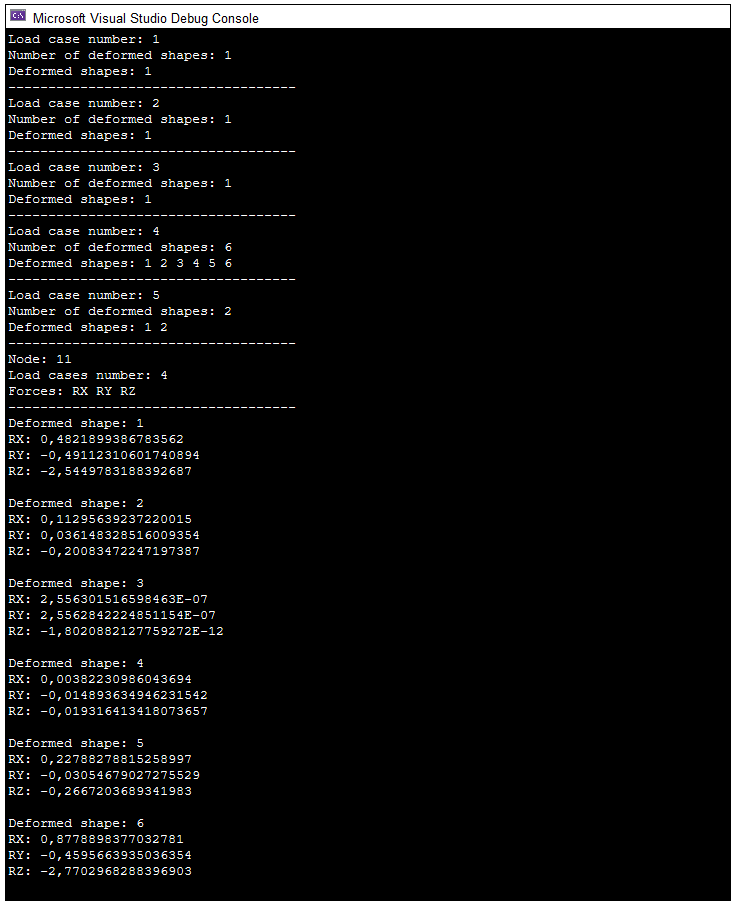
To access loads on a fragment, you will need the LiraLoadCaseInfos interface (information about all load cases), LiraLoadCaseInfo (information about a specific load case), LiraFragmLoadsRequest (forming the request), and LiraFragmLoadsResponse (retrieving the loads). Open the test problem 05_Steel_tower.lir in LIRA-FEM and submit it for calculation. Then copy the example code below and paste it into your C# project. How to create a project in Visual Studio is described here.
// include the LiraFemRes library
using LiraFemRes;
var Result = new LiraResultsAccess();
// declaration and initialization of the Request interface
LiraFragmLoadsRequest Request = Result.CreateNewRequest(LiraRequestEnum.kLiraRequest_FragmLoadForces) as LiraFragmLoadsRequest;
// declaration of the Response interface
LiraFragmLoadsResponse Response;
// initialization of the DocumentName field (project name)
Request.DocumentName = "05_Steel_tower";
// populating the Nodes array with node numbers
Request.Nodes.AddFromString("1-37");
// processing the request
try
{
	Response = Result.FragmLoads(Request);
}
catch (Exception e)
{
	Console.WriteLine("Error: " + e.HResult);
	return;
}
// retrieving data about all load cases
LiraLoadCaseInfos LoadCases = Response.LoadCases;
for (int i = 0; i < LoadCases.Count; i++)
{
	LiraLoadCaseInfo LoadCase = LoadCases.Item[i];
	// printing the load case number
	Console.WriteLine("Load case number: " + LoadCase.Number);
	// printing the number of components
	Console.WriteLine("Number of deformed shapes: " + LoadCase.DeformedShapeCount);
	// printing the numbers of the components
	var DynamicModeShapesArray = new LiraLongsArray();
	DynamicModeShapesArray = LoadCase.DeformedShapes;
	Console.Write("Deformed shapes: ");
	for (int j = 0; j < DynamicModeShapesArray.Count; j++)
		Console.Write(DynamicModeShapesArray.Item[j] + " ");
	Console.WriteLine("\n------------------------------------");
}
// declaration of the ShapesArray array
var ShapesArray = new LiraLongsArray();
// populating the ShapesArray array with the component numbers
ShapesArray = LoadCases.Item[3].DeformedShapes;
// load case number
int LC = LoadCases.Item[3].Number;
// node number
int Node = 11;
// printing the node number to the console
Console.WriteLine("Node: " + Node);

// printing the load case number to the console
Console.WriteLine("Load cases number: " + LC);
// initialization of the list of internal forces (LiraFragmLoadForceEnum)
string[] StringFragmForces = { "Undefined", "RX", "RY", "RZ", "RUX", "RUY", "RUZ", "RBW" };
// retrieving the forces on the fragment
LiraLongsArray Forces = Response.Forces;
// printing the list of forces on the fragment to the console
Console.Write("Forces: ");
for (int i = 0; i < Forces.Count; i++)
    Console.Write(StringFragmForces[Forces.Item[i]] + " ");

Console.WriteLine("\n------------------------------------");
// printing the force values at node Node from load case LC for all components
for (int i = 0; i < LoadCases.Item[3].DeformedShapeCount; i++)
{
	// component number
	int shape = ShapesArray.Item[i];
	Console.WriteLine("Deformed shape: " + shape);
	Console.WriteLine("RX: " + Response.GetNodeRX(Node, LC, shape));
	Console.WriteLine("RY: " + Response.GetNodeRY(Node, LC, shape));
	Console.WriteLine("RZ: " + Response.GetNodeRZ(Node, LC, shape));
	Console.WriteLine("");
}
Compile the program (Build --> Build Solution) and run it (Debug --> Start Debugging).
PunchLoads: access to loads on punching perimeters
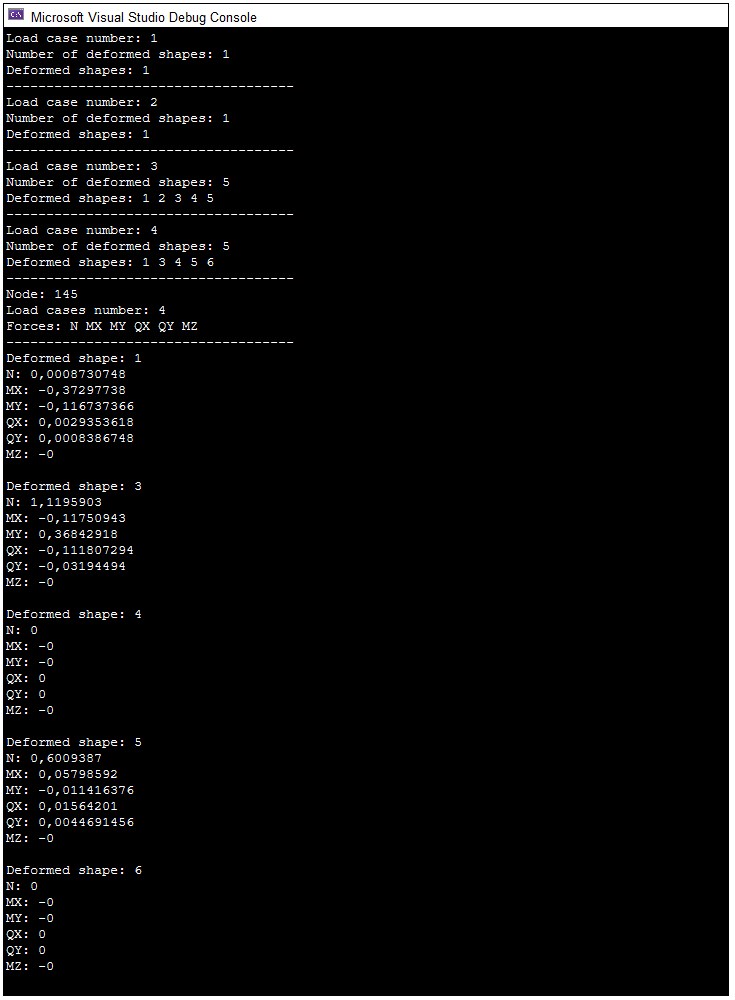
To access loads on punching perimeters, you will need the LiraLoadCaseInfos interface (information about all load cases), LiraLoadCaseInfo (information about a specific load case), LiraPunchLoadsRequest (forming the request), and LiraPunchLoadsResponse (retrieving the loads). Open the test problem Punching_Emergency_Dynamic_Load_Cases.lir in LIRA-FEM and submit it for calculation. Then copy the example code below and paste it into your C# project. How to create a project in Visual Studio is described here.
// include the LiraFemRes library
using LiraFemRes;
var Result = new LiraResultsAccess();
// declaration and initialization of the Request interface
LiraPunchLoadsRequest Request = Result.CreateNewRequest(LiraRequestEnum.kLiraRequest_PunchLoadForces) as LiraPunchLoadsRequest;
// declaration of the Response interface
LiraPunchLoadsResponse Response;
// initialization of the DocumentName field (project name)
Request.DocumentName = "Punching_Emergency_Dynamic_Load_Cases";
// populating the Nodes array with node numbers
Request.Nodes.AddFromString("1-999");
// processing the request
try
{
	Response = Result.PunchLoads(Request);
}
catch (Exception e)
{
	Console.WriteLine("Error: " + e.HResult);
	return;
}
// retrieving data about all load cases
LiraLoadCaseInfos LoadCases = Response.LoadCases;
for (int i = 0; i < LoadCases.Count; i++)
{
	LiraLoadCaseInfo LoadCase = LoadCases.Item[i];
	// printing the load case number
	Console.WriteLine("Load case number: " + LoadCase.Number);
	// printing the number of components
	Console.WriteLine("Number of deformed shapes: " + LoadCase.DeformedShapeCount);
	// printing the numbers of the components
	var DynamicModeShapesArray = new LiraLongsArray();
	DynamicModeShapesArray = LoadCase.DeformedShapes;
	Console.Write("Deformed shapes: ");
	for (int j = 0; j < DynamicModeShapesArray.Count; j++)
		Console.Write(DynamicModeShapesArray.Item[j] + " ");
	Console.WriteLine("\n------------------------------------");
}
// declaration of the ShapesArray array
var ShapesArray = new LiraLongsArray();
// populating the ShapesArray array with the component numbers
ShapesArray = LoadCases.Item[3].DeformedShapes;
// load case number
int LC = LoadCases.Item[3].Number;
// node number
int Node = 145;
// printing the node number to the console
Console.WriteLine("Node: " + Node);
// printing the load case number to the console
Console.WriteLine("Load cases number: " + LC);
// initialization of the list of internal forces (LiraPunchLoadForceEnum)
string[] StringElementForces = { "Undefined", "N", "MX", "MY", "QX", "QY", "MZ" };
// retrieving the forces on the element
LiraLongsArray Forces = Response.Forces;
// printing the list of forces on the element to the console
Console.Write("Forces: ");
for (int i = 0; i < Forces.Count; i++)
    Console.Write(StringElementForces[Forces.Item[i]] + " ");
Console.WriteLine("\n------------------------------------");
// printing the force values at node Node from load case LC for all components
for (int i = 0; i < LoadCases.Item[3].DeformedShapeCount; i++)
{
	// component number
	int shape = ShapesArray.Item[i];
	Console.WriteLine("Deformed shape: " + shape);
	Console.WriteLine("N: " + Response.GetNodeN(Node, LC, shape));
	Console.WriteLine("MX: " + Response.GetNodeMX(Node, LC, shape));
	Console.WriteLine("MY: " + Response.GetNodeMY(Node, LC, shape));
	Console.WriteLine("QX: " + Response.GetNodeQX(Node, LC, shape));
	Console.WriteLine("QY: " + Response.GetNodeQY(Node, LC, shape));
	Console.WriteLine("MZ: " + Response.GetNodeMZ(Node, LC, shape));
	Console.WriteLine("");
}
Compile the program (Build --> Build Solution) and run it (Debug --> Start Debugging).
DesignCombinationForces: access to forces occurring in elements from design combinations
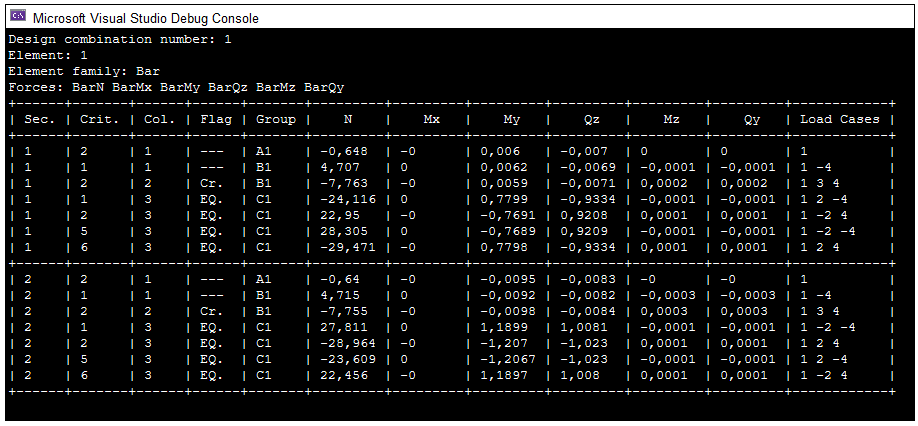
To access the forces occurring in elements from design combinations, you will need the LiraDesignCombinationForcesRequest interface (forming the request) and LiraDesignCombinationForcesResponse (retrieving the loads). Open the test problem 05_Steel_tower_RSU.lir in LIRA-FEM and submit it for calculation. Then copy the example code below and paste it into your C# project. How to create a project in Visual Studio is described here.
// include the LiraFemRes library
using LiraFemRes;
var Result = new LiraResultsAccess();
// declaration and initialization of the Request interface
LiraDesignCombinationForcesRequest Request = Result.CreateNewRequest(LiraRequestEnum.kLiraRequest_DesignCombinationForces) as LiraDesignCombinationForcesRequest;
// declaration of the Response interface
LiraDesignCombinationForcesResponse Response;
// initialization of the DocumentName field (project name)
Request.DocumentName = "05_Steel_tower_RSU";
// populating the Elements array with finite element numbers
Request.Elements.AddFromString("1-99");
// table number
Request.DesignCombinationTable = 1;
// processing the request
try
{
	Response = Result.DesignCombinationForces(Request);
}
catch (Exception e)
{
	Console.WriteLine("Error: " + e.HResult);
	return;
}
// flags indicating the presence of crane and/or seismic load cases in the combinations (LiraCraneEarthquakeFlagsEnum)
string[] Flags = { "---", "Cr.", "EQ.", "Both" };
// internal groups of the design combination of forces (LiraInternalGroupsEnum)
string[] InternalGroups = { "Undefined", "A1", "B1", "C1", "D1", "A2", "B2", "C2", "D2", "E1" };
int Element = 1;
int DC = 1;
// printing the design combination number to the console
Console.WriteLine("Design combination number: " + DC);
// list of finite element families (LiraElementFamilyEnum)
string[] ElementFamilyes = { "Undefined", "Bar", "Plate", "Solid", "SpecElement", "Spec_58_5", "Spec_310", "Spec_264" };
// printing the element number to the console
Console.WriteLine("Element: " + Element);
// retrieving the family of the finite element
int ElementFamily = (int)Response.GetFamily(Element);
// printing the name of the family the finite element belongs to, to the console
Console.WriteLine("Element family: " + ElementFamilyes[ElementFamily]);
// initialization of the list of internal forces (LiraForceEnum)
string[] StringElementForces = { "Undefined", "BarN", "BarMx", "BarMy", "BarQz", "BarMz", "BarQy", "BarRy", "BarRz", "BarBw", "BarTw", "PlateNx", "PlateNy", "PlateNz", "PlateTxy", "PlateTxz", "PlateMx", "PlateMy", "PlateMxy", "PlateQx", "PlateQy", "PlateRz", "SolidNx", "SolidNy", "SolidNz", "SolidTxy", "SolidTxz", "SolidTyz", "SpecElementRx", "SpecElementRy", "SpecElementRz", "SpecElementRux", "SpecElementRuy", "SpecElementRuz", "Spec_58_59_Qz", "Spec_58_59_Ny", "Spec_58_59_Qx", "Spec_310_N", "Spec_310_My", "Spec_310_Qz", "Spec_310_Mx", "Spec_310_Mz", "Spec_310_Qy", "Spec_264_N", "Spec_264_Qz", "Spec_264_Qy" };
// retrieving the forces in the finite element
LiraLongsArray ElementForces = Response.GetForces(Element);
// printing the list of forces in the finite element to the console
Console.Write("Forces: ");
for (int i = 0; i < ElementForces.Count; i++)
    Console.Write(StringElementForces[ElementForces.Item[i]] + " ");
Console.WriteLine();
// printing the ultimate design combination data for element Element
int LS = (int)LiraLimitStateForcesEnum.kLiraLimitStateForces_UltimateFull;
Console.WriteLine("+------+-------+------+------+-------+---------+---------+---------+---------+---------+---------+------------+");
Console.WriteLine("| Sec. | Crit. | Col. | Flag | Group |    N    |   Mx    |   My    |   Qz    |   Mz    |   Qy    | Load Cases |");
Console.WriteLine("+------+-------+------+------+-------+---------+---------+---------+---------+---------+---------+------------+");

for (int CS = 1; CS <= Response.GetSectionCount(Element); CS++)
{
	// number of design combinations of forces at section CS of element Element
	int DCLCount = Response.GetDCLCount(Element, CS, LS);
	for (int DCF = 1; DCF <= DCLCount; DCF++)
	{
		// criterion number
		int Crit = Response.GetCriterionNumber(Element, CS, LS, DCF);
		// combination coefficients column number
		int Col = Response.GetColumnNumber(Element, CS, LS, DCF);
		// flag indicating the presence of crane and/or seismic load cases in the combination
		int Flag = (int)Response.GetCraneEarthquakeFlag(Element, CS, LS, DCF);
		// internal group index
		int Group = (int)Response.GetInternalGroup(Element, CS, LS, DCF);
		// forces (retrieval and rounding)
		double N = Math.Round(Response.GetBarN(Element, CS, LS, DCF), 3);
		double Mx = Math.Round(Response.GetBarMx(Element, CS, LS, DCF), 3);
		double My = Math.Round(Response.GetBarMy(Element, CS, LS, DCF), 3);
		double Qz = Math.Round(Response.GetBarQz(Element, CS, LS, DCF), 3);
		double Mz = Math.Round(Response.GetBarMz(Element, CS, LS, DCF), 3);
		double Qy = Math.Round(Response.GetBarQy(Element, CS, LS, DCF), 3);
		string LoadCasesStr = "";
		// array of load cases
		ILiraLongsArray LoadCasesArr = Response.GetLoadCases(Element, CS, LS, DCF);
		for (int j = 0; j < LoadCasesArr.Count; j++)
			LoadCasesStr = string.Concat(LoadCasesStr, LoadCasesArr.Item[j].ToString() + " ");
		Console.Write("| {0,-4} | {1,-5} | {2,-4} | {3,-4} | {4,-5} ", CS, Crit, Col, Flags[Flag], InternalGroups[Group]);
		Console.WriteLine("| {0,-7} | {1,-7} | {2,-7} | {3,-7} | {4,-7} | {5,-7} | {6,-10} |", N, Mx, My, Qz, Mz, Qy, LoadCasesStr);
	}
Console.WriteLine("+------+-------+------+------+-------+---------+---------+---------+---------+---------+---------+------------+");
}
Compile the program (Build --> Build Solution) and run it (Debug --> Start Debugging).
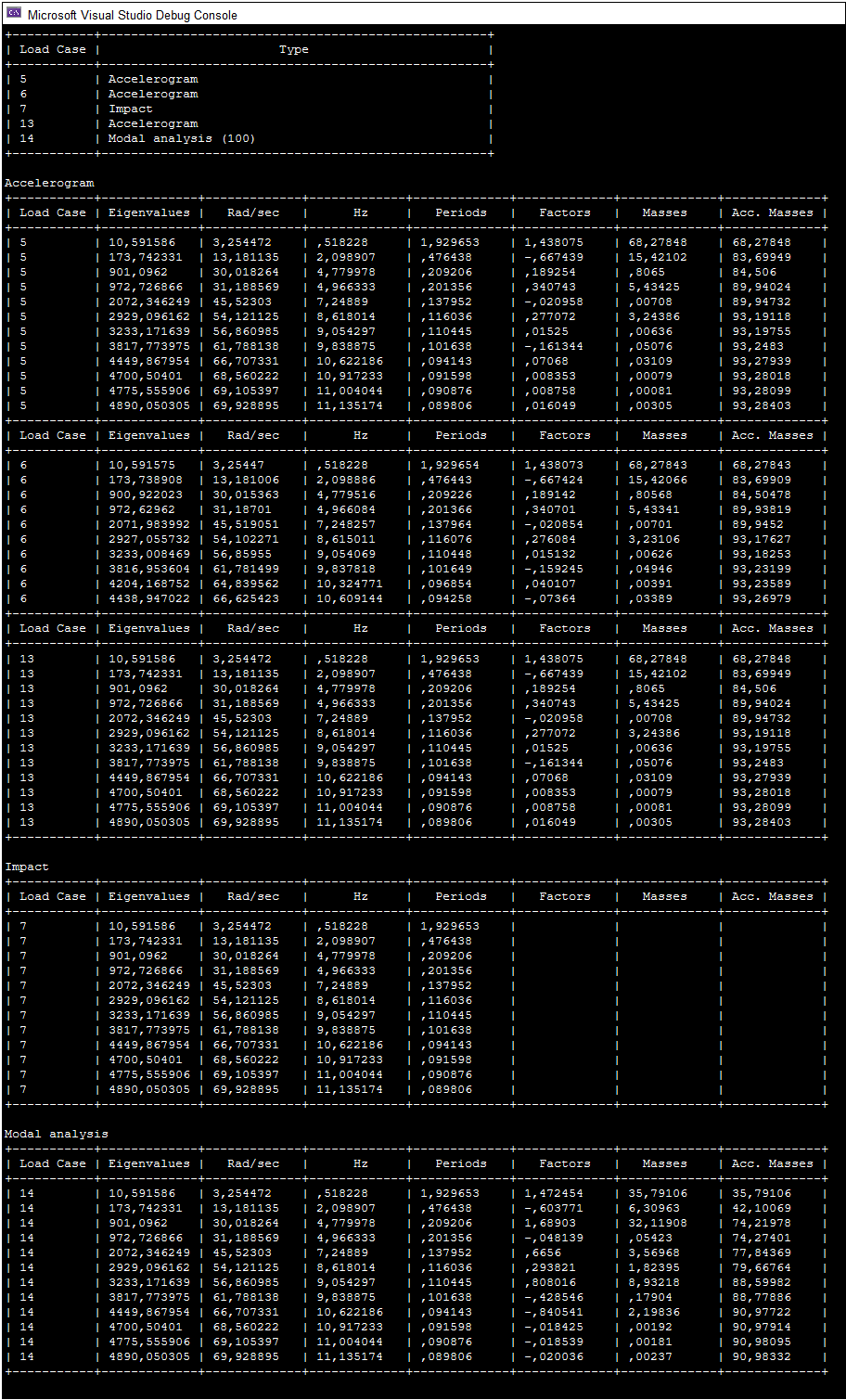
PeriodsOfVibrations: obtaining the frequencies of dynamic load cases
To obtain the frequencies of dynamic load cases, you will need the LiraPeriodsOfVibrationsRequest interface (forming the request) and LiraPeriodsOfVibrationsResponse (retrieving the frequencies). Open the test problem 01_2D_frame_RC.lir in LIRA-FEM and submit it for calculation. Then copy the example code below and paste it into your C# project. How to create a project in Visual Studio is described here.
// include the LiraFemRes library
using LiraFemRes;
// declaration of the Response interface
LiraPeriodsOfVibrationsResponse Response;
var Result = new LiraResultsAccess();
// declaration and initialization of the Request interface
LiraPeriodsOfVibrationsRequest Request = Result.CreateNewRequest(LiraRequestEnum.kLiraRequest_PeriodsOfVibrations)
as LiraPeriodsOfVibrationsRequest;
// initialization of the DocumentName field (project name)
Request.DocumentName = "01_2D_frame_RC";
// processing the request
try
{
	Response = Result.PeriodsOfVibrations(Request);
}
catch (Exception e)
{
	Console.WriteLine("Error: " + e.HResult);
	return;
}
// list of dynamic load case types as strings
string[] LoadCaseTypes = { "Undefined dynamic load case", "Earthquake (SNIP II-7-81*)", "Pulsation", "Impulse", "Impact", "Harmonic", "Accelerogram", "Three-component accelerogram", "Earthquake (SNIP II - 7 - 81 * modif.1996)", "Earthquake (SNRA II - 6.02 - 2006)", "Earthquake (KMK 2.01.03-2019)", "Earthquake (MGSN 4.19 - 05)", "Earthquake / 01.01.2000 / SP 14.13330.2011 /", "Earthquake (DBN B.1.1-12:2006)", "Earthquake (DBN B.1.1-12:2006, App.B)", "Earthquake (with torsion)", "Earthquake (SNT 2.01.08-99*)", "Earthquake (NF P 06-013)", "Earthquake (response spectrum)", "Earthquake (IBC-2006)", "Earthquake (SNIP RK 2.03-30-2006)", "Earthquake (EN 1998 - 1:2004)", "Earthquake (RPA 99 (2003))", "Earthquake (DBN B.1.1-12:2006, App.G)", "Earthquake (NP-031-01 for nuclear plants)", "Earthquake (MKC 22-07-2007)", "Earthquake (DBN B.2.2-24:2009)", "Earthquake (AzDTN 2.3-1-2010, with modif. of Jan 01,2014)", "Earthquake (PN 01.01.-09)", "Earthquake (SP 14.13330.2014/2018, modif.No.2,3)", "Earthquake (DBN B.1.1-12:2014)", "Earthquake (SNIP KP 20-02:2009)", "Earthquake (SP RK 2.03-30-2017, SN KR 20-02:2018)", "Earthquake (SP RK EN 1998-1:2004/2012, NTP RK 08-01.1-2017)", "Earthquake (SP 14.13330.2018, with Modif. No.1)", "Earthquake (TBEC-2018)", "Earthquake (three-component response spectrum)", "Modal analysis (100)" };
// list of dynamic load case types as LiraDynamicLoadCaseTypesEnum
LiraFemRes.LiraDynamicLoadCaseTypesEnum[] LoadCaseTypesEnums = { LiraDynamicLoadCaseTypesEnum.kLiraLoadCaseType_Undefined, LiraDynamicLoadCaseTypesEnum.kLiraLoadCaseType_Earthquake_20, LiraDynamicLoadCaseTypesEnum.kLiraLoadCaseType_Pulsation, LiraDynamicLoadCaseTypesEnum.kLiraLoadCaseType_Impulse, LiraDynamicLoadCaseTypesEnum.kLiraLoadCaseType_Impact, LiraDynamicLoadCaseTypesEnum.kLiraLoadCaseType_Harmonic, LiraDynamicLoadCaseTypesEnum.kLiraLoadCaseType_Accelerogram, LiraDynamicLoadCaseTypesEnum.kLiraLoadCaseType_Three_component_accelerogram, LiraDynamicLoadCaseTypesEnum.kLiraLoadCaseType_Earthquake_30, LiraDynamicLoadCaseTypesEnum.kLiraLoadCaseType_Earthquake_32, LiraDynamicLoadCaseTypesEnum.kLiraLoadCaseType_Earthquake_33, LiraDynamicLoadCaseTypesEnum.kLiraLoadCaseType_Earthquake_34, LiraDynamicLoadCaseTypesEnum.kLiraLoadCaseType_Earthquake_35, LiraDynamicLoadCaseTypesEnum.kLiraLoadCaseType_Earthquake_36, LiraDynamicLoadCaseTypesEnum.kLiraLoadCaseType_Earthquake_37,  LiraDynamicLoadCaseTypesEnum.kLiraLoadCaseType_Earthquake_38, LiraDynamicLoadCaseTypesEnum.kLiraLoadCaseType_Earthquake_39, LiraDynamicLoadCaseTypesEnum.kLiraLoadCaseType_Earthquake_40, LiraDynamicLoadCaseTypesEnum.kLiraLoadCaseType_Earthquake_41,  LiraDynamicLoadCaseTypesEnum.kLiraLoadCaseType_Earthquake_42, LiraDynamicLoadCaseTypesEnum.kLiraLoadCaseType_Earthquake_43, LiraDynamicLoadCaseTypesEnum.kLiraLoadCaseType_Earthquake_44, LiraDynamicLoadCaseTypesEnum.kLiraLoadCaseType_Earthquake_45,  LiraDynamicLoadCaseTypesEnum.kLiraLoadCaseType_Earthquake_46, LiraDynamicLoadCaseTypesEnum.kLiraLoadCaseType_Earthquake_47, LiraDynamicLoadCaseTypesEnum.kLiraLoadCaseType_Earthquake_48, LiraDynamicLoadCaseTypesEnum.kLiraLoadCaseType_Earthquake_49,  LiraDynamicLoadCaseTypesEnum.kLiraLoadCaseType_Earthquake_50, LiraDynamicLoadCaseTypesEnum.kLiraLoadCaseType_Earthquake_53, LiraDynamicLoadCaseTypesEnum.kLiraLoadCaseType_Earthquake_56, LiraDynamicLoadCaseTypesEnum.kLiraLoadCaseType_Earthquake_57,  LiraDynamicLoadCaseTypesEnum.kLiraLoadCaseType_Earthquake_58, LiraDynamicLoadCaseTypesEnum.kLiraLoadCaseType_Earthquake_60, LiraDynamicLoadCaseTypesEnum.kLiraLoadCaseType_Earthquake_61, LiraDynamicLoadCaseTypesEnum.kLiraLoadCaseType_Earthquake_62,  LiraDynamicLoadCaseTypesEnum.kLiraLoadCaseType_Earthquake_63, LiraDynamicLoadCaseTypesEnum.kLiraLoadCaseType_Earthquake_64, LiraDynamicLoadCaseTypesEnum.kLiraLoadCaseType_Modal_analysis_100 };
// creating a dictionary mapping LiraDynamicLoadCaseTypesEnum to LoadCaseTypes
SortedDictionary < LiraFemRes.LiraDynamicLoadCaseTypesEnum, string > LoadCaseTypeDictionary = new SortedDictionary < LiraFemRes.LiraDynamicLoadCaseTypesEnum, string > ();
for (int i = 0; i < LoadCaseTypesEnums.Count(); i++)
    LoadCaseTypeDictionary.Add(LoadCaseTypesEnums[i], LoadCaseTypes[i]);
// declaration of the array that will store the numbers of the dynamic load cases
var DynamicLoadCases = new LiraLongsArray();
// retrieving the numbers of the dynamic load cases
DynamicLoadCases = Response.LoadCaseNumbers;
Console.WriteLine("+-----------+----------------------------------------------------+");
Console.WriteLine("| Load Case |                        Type                        |");
Console.WriteLine("+-----------+----------------------------------------------------+");
for (int i = 0; i < DynamicLoadCases.Count; i++)
{
	string LoadCaseType = LoadCaseTypeDictionary[Response.GetDynamicLoadCaseType(DynamicLoadCases.Item[i])];
	Console.WriteLine("| {0,-9} | {1,-50} |", DynamicLoadCases.Item[i], LoadCaseType);
}
Console.WriteLine("+-----------+----------------------------------------------------+");
// printing accelerogram data
Console.WriteLine("\nAccelerogram");
for (int i = 0; i < DynamicLoadCases.Count; i++)
{
	if (Response.GetDynamicLoadCaseType(DynamicLoadCases.Item[i]) == LiraDynamicLoadCaseTypesEnum.kLiraLoadCaseType_Accelerogram)
	{
		Console.WriteLine("+-----------+-------------+-------------+-------------+-------------+-------------+-------------+-------------+");
		Console.WriteLine("| Load Case | Eigenvalues |   Rad/sec   |     Hz      |   Periods   |   Factors   |   Masses    | Acc. Masses |");
		Console.WriteLine("+-----------+-------------+-------------+-------------+-------------+-------------+-------------+-------------+");
		var Eigenvalues = Response.GetEigenvalues(DynamicLoadCases.Item[i]);
		var FreqRadSec = Response.GetFrequenciesRadPerSec(DynamicLoadCases.Item[i]);
		var FreqHz = Response.GetFrequenciesHz(DynamicLoadCases.Item[i]);
		var Periods = Response.GetPeriods(DynamicLoadCases.Item[i]);
		var Factors = Response.GetParticipFactors(DynamicLoadCases.Item[i]);
		var Masses = Response.GetModalMasses(DynamicLoadCases.Item[i]);
		var AccMasses = Response.GetAccumulatedModalMasses(DynamicLoadCases.Item[i]);
		for (int j = 0; j < Eigenvalues.Count; j++)
		{
			Console.Write("| {0,-9:##} | {1,-11:##.######} | {2,-11:##.######} ", DynamicLoadCases.Item[i], Eigenvalues.Item[j], FreqRadSec.Item[j]);
			Console.Write("| {0,-11:##.######} | {1,-11:##.######} | {2,-11:##.######} ", FreqHz.Item[j], Periods.Item[j], Factors.Item[j]);
			Console.WriteLine("| {0,-11:##.#####} | {1,-11:##.#####} |", Masses.Item[j], AccMasses.Item[j]);
		}
	}
}
Console.WriteLine("+-----------+-------------+-------------+-------------+-------------+-------------+-------------+-------------+");
// printing impact loads
Console.WriteLine("\nImpact");
for (int i = 0; i < DynamicLoadCases.Count; i++)
{
	if (Response.GetDynamicLoadCaseType(DynamicLoadCases.Item[i]) == LiraDynamicLoadCaseTypesEnum.kLiraLoadCaseType_Impact)
	{
		Console.WriteLine("+-----------+-------------+-------------+-------------+-------------+-------------+-------------+-------------+");
		Console.WriteLine("| Load Case | Eigenvalues |   Rad/sec   |     Hz      |   Periods   |   Factors   |   Masses    | Acc. Masses |");
		Console.WriteLine("+-----------+-------------+-------------+-------------+-------------+-------------+-------------+-------------+");
		var Eigenvalues = Response.GetEigenvalues(DynamicLoadCases.Item[i]);
		var FreqRadSec = Response.GetFrequenciesRadPerSec(DynamicLoadCases.Item[i]);
		var FreqHz = Response.GetFrequenciesHz(DynamicLoadCases.Item[i]);
		var Periods = Response.GetPeriods(DynamicLoadCases.Item[i]);
		var Factors = Response.GetParticipFactors(DynamicLoadCases.Item[i]);
		var Masses = Response.GetModalMasses(DynamicLoadCases.Item[i]);
		var AccMasses = Response.GetAccumulatedModalMasses(DynamicLoadCases.Item[i]);
		for (int j = 0; j < Eigenvalues.Count; j++)
		{
			Console.Write("| {0,-9:##} | {1,-11:##.######} | {2,-11:##.######} ", DynamicLoadCases.Item[i], Eigenvalues.Item[j], FreqRadSec.Item[j]);
			Console.Write("| {0,-11:##.######} | {1,-11:##.######} | {2,-11:##.######} ", FreqHz.Item[j], Periods.Item[j], Factors.Item[j]);
			Console.WriteLine("| {0,-11:##.#####} | {1,-11:##.#####} |", Masses.Item[j], AccMasses.Item[j]);
		}
	}
}
Console.WriteLine("+-----------+-------------+-------------+-------------+-------------+-------------+-------------+-------------+");
// printing modal analysis data
Console.WriteLine("\nModal analysis");
for (int i = 0; i < DynamicLoadCases.Count; i++)
{
	if (Response.GetDynamicLoadCaseType(DynamicLoadCases.Item[i]) == LiraDynamicLoadCaseTypesEnum.kLiraLoadCaseType_Modal_analysis_100)
	{
		Console.WriteLine("+-----------+-------------+-------------+-------------+-------------+-------------+-------------+-------------+");
		Console.WriteLine("| Load Case | Eigenvalues |   Rad/sec   |     Hz      |   Periods   |   Factors   |   Masses    | Acc. Masses |");
		Console.WriteLine("+-----------+-------------+-------------+-------------+-------------+-------------+-------------+-------------+");

		var Eigenvalues = Response.GetEigenvalues(DynamicLoadCases.Item[i]);
		var FreqRadSec = Response.GetFrequenciesRadPerSec(DynamicLoadCases.Item[i]);
		var FreqHz = Response.GetFrequenciesHz(DynamicLoadCases.Item[i]);
		var Periods = Response.GetPeriods(DynamicLoadCases.Item[i]);
		var Factors = Response.GetParticipFactors(DynamicLoadCases.Item[i]);
		var Masses = Response.GetModalMasses(DynamicLoadCases.Item[i]);
		var AccMasses = Response.GetAccumulatedModalMasses(DynamicLoadCases.Item[i]);
		for (int j = 0; j < Eigenvalues.Count; j++)
		{
			Console.Write("| {0,-9:##} | {1,-11:##.######} | {2,-11:##.######} ", DynamicLoadCases.Item[i], Eigenvalues.Item[j], FreqRadSec.Item[j]);
			Console.Write("| {0,-11:##.######} | {1,-11:##.######} | {2,-11:##.######} ", FreqHz.Item[j], Periods.Item[j], Factors.Item[j]);
			Console.WriteLine("| {0,-11:##.#####} | {1,-11:##.#####} |", Masses.Item[j], AccMasses.Item[j]);
		}
	}
}
Console.WriteLine("+-----------+-------------+-------------+-------------+-------------+-------------+-------------+-------------+");
Compile the program (Build --> Build Solution) and run it (Debug --> Start Debugging).
SelectedReinforcement: access to reinforcement data of elements
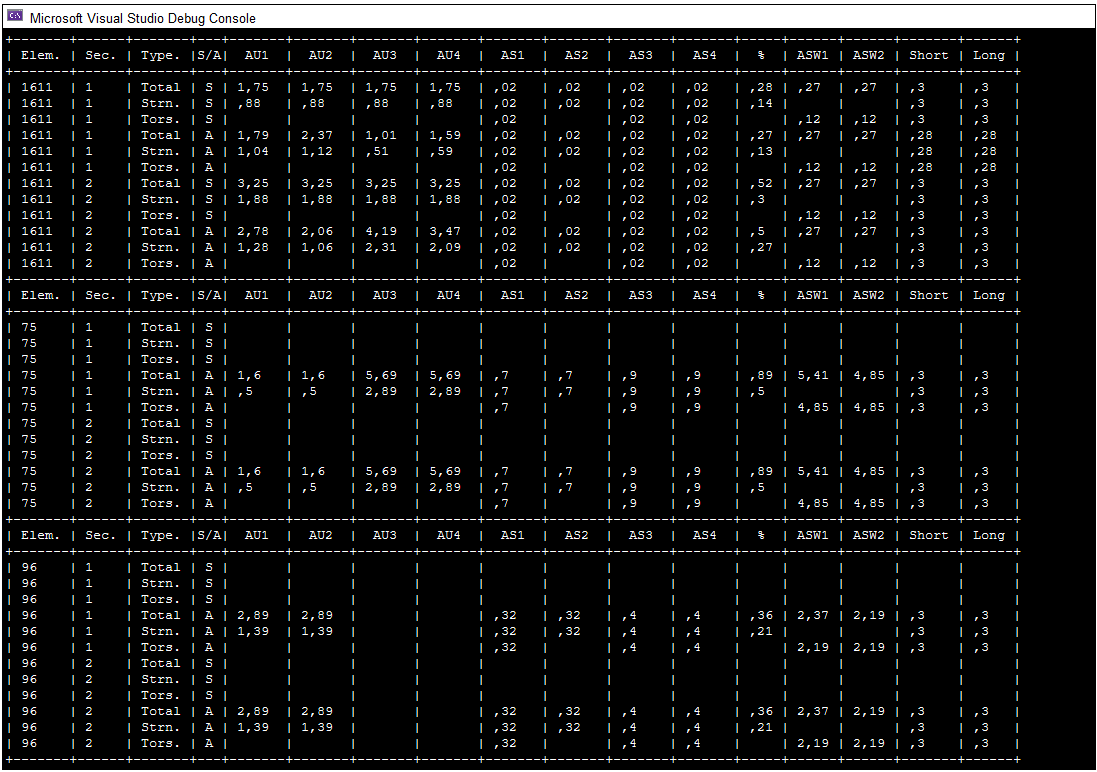
To obtain reinforcement data of elements, you will need the LiraSelectedReinforcementRequest interface (forming the request) and LiraSelectedReinforcementResponse (retrieving the data). Open the test problem example18_fire.lir in LIRA-FEM and submit it for calculation. Then copy the example code below and paste it into your C# project. How to create a project in Visual Studio is described here.
// include the LiraFemRes library
using LiraFemRes;
// declaration of the Response interface
LiraSelectedReinforcementResponse Response;
var Result = new LiraResultsAccess();
// declaration and initialization of the Request interface
LiraSelectedReinforcementRequest Request = Result.CreateNewRequest(LiraRequestEnum.kLiraRequest_SelectedReinforcement) as LiraSelectedReinforcementRequest;
// initialization of the DocumentName field (project name)
Request.DocumentName = "example18_fire";
// initialization of the field responsible for the reinforcement design option number
Request.DesignOption = 1;
// initialization of the list of elements
Request.Elements.AddFromString("1611,75,96");
// initialization of the array of reinforcement data categories
LiraReinforcementDataEnum[] RD = { LiraReinforcementDataEnum.kLiraReinforcementData_Total, LiraReinforcementDataEnum.kLiraReinforcementData_Strength, LiraReinforcementDataEnum.kLiraReinforcementData_Torsion };
// string representation of the RD elements
string[] RDstr = { "Total", "Strn.", "Tors." };
Request.ReinforcementData.Count = RD.Length;
// populating the array with the reinforcement data category in the request
for (int i = 0; i < RD.Length; i++)
    Request.ReinforcementData.Item[i] = (int)RD[i];
// processing the request
try
{
	Response = Result.SelectedReinforcement(Request);
}
catch (Exception e)
{
	Console.WriteLine("Error: " + e.HResult);
	return;
}
// array of arbitrary elements for which reinforcement data will be printed to the console
int[] Elements = { 1611, 75, 96 };
for (int i = 0; i < Elements.Length; i++)
{
	Console.WriteLine("+-------+------+-------+---+-------+-------+-------+-------+-------+-------+-------+-------+-----+------+------+-------+------+");
	Console.WriteLine("| Elem. | Sec. | Type. |S/A|  AU1  |  AU2  |  AU3  |  AU4  |  AS1  |  AS2  |  AS3  |  AS4  |  %  | ASW1 | ASW2 | Short | Long |");
	Console.WriteLine("+-------+------+-------+---+-------+-------+-------+-------+-------+-------+-------+-------+-----+------+------+-------+------+");
	int SecCount = Response.GetSectionCount(Elements[i]);
	for (int CS = 1; CS <= SecCount; CS++)
	{
		for (int s = 1; s >= 0; s--)
		{
			for (int k = 0; k < RD.Length; k++)
			{
				// symmetry / asymmetry
				string SA = "S";
				if (s == 0)
				SA = "A";
				// error code
				int Err = 0;
				// retrieving the reinforcement data
				float AU1 = Response.GetBarAU1(Elements[i], CS, RD[k], s, 0, out Err);
				float AU2 = Response.GetBarAU2(Elements[i], CS, RD[k], s, 0, out Err);
				float AU3 = Response.GetBarAU3(Elements[i], CS, RD[k], s, 0, out Err);
				float AU4 = Response.GetBarAU4(Elements[i], CS, RD[k], s, 0, out Err);
				float AS1 = Response.GetBarAS1(Elements[i], CS, RD[k], s, 0, out Err);
				float AS2 = Response.GetBarAS2(Elements[i], CS, RD[k], s, 0, out Err);
				float AS3 = Response.GetBarAS3(Elements[i], CS, RD[k], s, 0, out Err);
				float AS4 = Response.GetBarAS4(Elements[i], CS, RD[k], s, 0, out Err);
				float Pre = Response.GetBarPERC(Elements[i], CS, RD[k], s, 0, out Err);
				float ASW1 = Response.GetBarASW1(Elements[i], CS, RD[k], s, 0, out Err);
				float ASW2 = Response.GetBarASW2(Elements[i], CS, RD[k], s, 0, out Err);
				float CrShrt = Response.GetBarCrackSHORT(Elements[i], CS, s, 0, out Err);
				float CrLong = Response.GetBarCrackLONG(Elements[i], CS, s, 0, out Err);
				// printing the reinforcement data to the console
				Console.Write("| {0,-5} | {1,-4} | {2,-5} | {3,-1} ", Elements[i], CS, RDstr[k], SA);
				Console.Write("| {0,-5:#.##} | {1,-5:#.##} | {2,-5:#.##} | {3,-5:#.##} ", AU1, AU2, AU3, AU4);
				Console.Write("| {0,-5:#.##} | {1,-5:#.##} | {2,-5:#.##} | {3,-5:#.##} ", AS1, AS2, AS3, AS4);
				Console.Write("| {0,-3:#.##} | {1,-4:#.##} | {2,-4:#.##} ", Pre, ASW1, ASW2);
				Console.WriteLine("| {0,-5:#.##} | {1,-4:#.##} |", CrShrt, CrLong);
			}
		}
	}
}
Console.WriteLine("+-------+------+-------+---+-------+-------+-------+-------+-------+-------+-------+-------+-----+------+------+-------+------+");
Compile the program (Build --> Build Solution) and run it (Debug --> Start Debugging).
Interface Table
The table lists the interfaces that provide access to calculation results. The interfaces can be loosely divided into groups: base, auxiliary, informational, request interfaces, and access (response) interfaces.
Base interfaces (ILiraResultRequestBase, ILiraResultsAccess) are intended for creating request and response objects.
Auxiliary interfaces (ILiraLongsArray, ILiraDoublesArray) are used for working with arrays of numbers.
Informational interfaces have the keyword Info at the end of their name and are intended for accessing information about load cases, about the history of nonlinear load cases, and data on load combinations and design combinations.
Request interfaces have the keyword Request at the end of their name and are intended for forming the request.
Access interfaces have the keyword Response at the end of their name and are intended for accessing the requested data.
| Interface Name | Brief Description |
|---|---|
| ILiraLongsArray | Auxiliary interface for an array of numbers of type long |
| ILiraDoublesArray | Auxiliary interface for an array of numbers of type double |
| ILiraResultRequestBase | Base interface for requesting LIRA-FEM calculation results |
| ILiraLoadCaseDisplacementsRequest | Interface for requesting node displacements from load cases |
| ILiraLoadCaseForcesRequest | Interface for requesting forces from load cases |
| ILiraLoadCombinationDisplacementsRequest | Interface for requesting node displacements from load combinations |
| ILiraLoadCombinationForcesRequest | Interface for requesting forces from load combinations |
| ILiraFragmLoadsRequest | Interface for requesting loads on a fragment |
| ILiraPunchLoadsRequest | Interface for requesting loads on punching shear contours |
| ILiraDesignCombinationForcesRequest | Interface for requesting forces from design combinations |
| ILiraPeriodsOfVibrationsRequest | Interface for requesting the frequencies of dynamic load cases |
| ILiraSelectedReinforcementRequest | Interface for requesting reinforcement data in elements |
| ILiraLoadCaseInfo | Interface for accessing the properties of a load case |
| ILiraLoadCaseInfos | Interface for accessing the array of load case properties |
| ILiraLoadHistoryInfo | Interface for accessing the properties of the nonlinear load case history |
| ILiraLoadHistoryInfos | Interface for accessing the array of nonlinear load case history properties |
| ILiraLoadCombinationInfo | Interface for accessing the properties of a load combination |
| ILiraLoadCombinationInfos | Interface for accessing the array of load combination properties |
| ILiraLoadCaseDisplacementsResponse | Interface for retrieving node displacements from load cases |
| ILiraLoadCombinationDisplacementsResponse | Interface for retrieving node displacements from load combinations |
| ILiraLoadCaseForcesResponse | Interface for retrieving forces occurring in finite elements from load cases |
| ILiraLoadCombinationForcesResponse | Interface for retrieving forces occurring in finite elements from load combinations |
| ILiraFragmLoadsResponse | Interface for retrieving loads on a fragment |
| ILiraPunchLoadsResponse | Interface for retrieving loads on punching shear contours |
| ILiraDesignCombinationForcesResponse | Interface for retrieving forces occurring in elements from design combinations |
| ILiraPeriodsOfVibrationsResponse | Interface for accessing the vibration periods of dynamic load cases |
| ILiraSelectedReinforcementResponse | Interface for retrieving reinforcement data in elements |
| ILiraResultsAccess | Base interface for accessing results |
If you find a mistake and want to inform us about it, select the mistake, then hold down the CTRL key and click ENTER.
Comments